You can download site data from LandPKS Soil ID in either CSV or JSON file format.
Note: public site data will be accessible through the LandPKS Data Portal.
Choose data to export
Export data from:

Export single site data from the site dashboard.

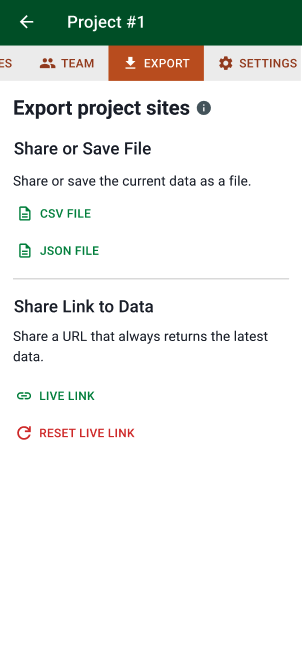
Export project data from the project Export tab.

Export data from all sites to which you have access from the app settings menu found at the bottom of the main Sites and Projects screens.
Export options
Export screens allow you to obtain a file in CSV or JSON format. You can also create, reset, and share a link to give others access to export the data.
Share or Save File
Tap CSV File or JSON File to share or save the current site data as a file. You can send the file using email, messaging, or other applications, or save it to your device.
Share Link to Data
Tap Live Link to create a URL to a web page that always provides the latest data.
Tap Reset Live Link to revoke the existing live link and create a new one.
File Format
CSV (Comma-Separated Values) files work with spreadsheet applications like Excel and Google Sheets. This format is best for viewing, sorting, and analyzing data in a familiar table format.
JSON (JavaScript Object Notation) is a structured computer-readable data format. It is best for software developers or for importing into other software systems.
Export page from Live Link
Users who tap Live Link receive a URL to an export page in the browser. This page can be viewed by anyone with the link. Use Reset Live Link in the app to revoke access and create a new link.
Tap Download CSV or Download JSON to download the current data.
Tap Copy Link to copy the direct URL for the CSV or JSON file. Use this URL for integrating with scripts, automated workflows, or when you want others to always have access to the most current data.